Icons
A system of icons which establishes a visual language that can be easily understood regardless of age, language or culture.
| Icon | Name | Use |
|---|---|---|
| Caution | To indicate a crucial decision | |
| Search | To search for something | |
| Get info | To get information | |
| User | To support a user name | |
| Copy | To copy text | |
| Delete | To delete something | |
| Download | To download | |
| Notification | To notify the user of something | |
| Close | To close a modal or other UI | |
| Complete | To show a completed process | |
| Error | To indicate an error | |
| Go forward | To navigate forward | |
| Go backward | To navigate backward | |
| Edit | To edit something | |
| Settings | To edit user or app settings | |
| Plus | To add | |
| Minus | To subtract or remove | |
| Filter | To filter results |
# Built on a grid
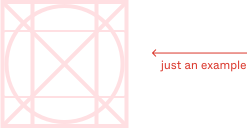
Every icon is built on a grid at a specific size. This ensures not only visual consistency, but allows us to easily swap icons in various applications.
# Design your own
This grid is also included as a component in Figma. If you need to create something new, just drag out an instance and start drawing.
# Guidelines
# Page structure first
Once your structure is solid, and you get to the point where icons, delight & Co. can come into play, follow this simple rule: Use as few icons as necessary—but not fewer.
Add icons at the very end of the design process, do not play with icons while working on your wireframes.
# UI indicators vs. icons
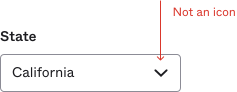
UI indicators are visual indicators that are baked into UIs like the radio circle, checkbox check, and select caret. In some cases we can override these indicators to match our overall aesthetics and style which can make it seem like they are icons.
# When to use an icon
If you want to call attention to an action you want a user to take, icons make good targets and break up text.
# Use words
Almost all icons should be accompanied by copy. By doing so, you won't leave users guessing what an icon represents.
As best practice, use a verb to suggest an action. For more clarity use a verb + noun.
Best!
Good
Bad
# Choosing the right icon
It’s recommended to use a word to accompany an icon. Like the previous example shows, icons should call attention to the action and the icon should follow suit. Depending on the situation, some icons are better for clicking, where others are better suited as static.
Do
As a result, this will drastically reduce the amount of icons we have, increase understanding and clarity in our actions.
Don't
# Color
By default, all icons are Grey 900. If using an icon on top of a solid color, for example in a primary button, it should be White. As a general guideline, icons should be the same color as their accompanying text.
Do
As an example, if you have a “Abort mission” button, do not colorize the delete button or trashcan icon with Green 400.